DayPilot
| Downloads | |
|---|---|
| Languages | phpJavaScript |
| Technologies | MySQL |
Overview
-
Record restaurant table reservations using a visual interface
-
Find free tables easily (filter by time and number of seats)
-
Tables grouped by location (e.g. Indoors, Terrace)
-
HTML5/JavaScript frontend and PHP REST backend
-
MySQL database (the database is created and initialized automatically on first load)
-
SQLite database for no-installation testing
-
Built using a JavaScript Scheduler UI component from DayPilot Pro for JavaScript
This tutorial is also available for ASP.NET Core: ASP.NET Core Restaurant Table Reservation (Tutorial)
License
Licensed for testing and evaluation purposes. Please see the license agreement included in the sample project. You can use the source code of the tutorial if you are a licensed user of DayPilot Pro for JavaScript.
Find Available Restaurant Tables by Seats

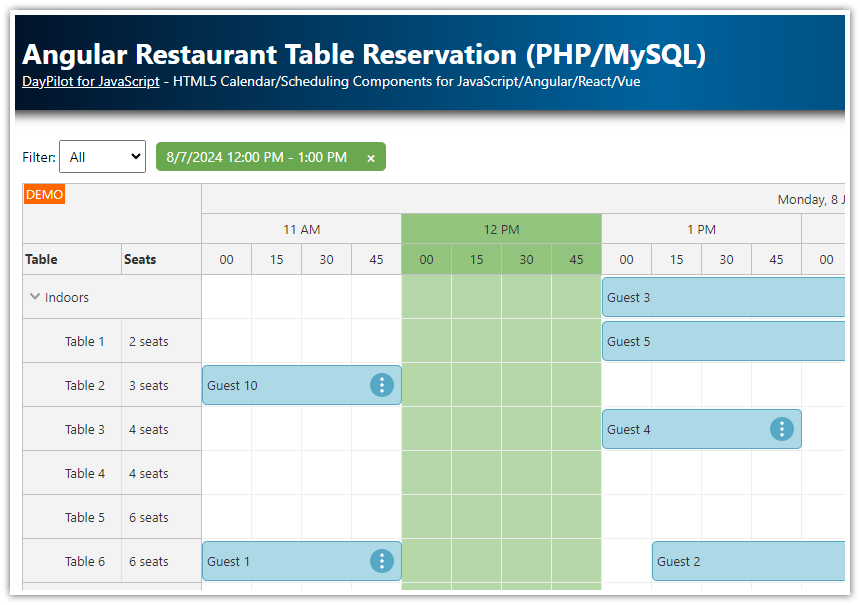
This restaurant table reservation application lets you filter the tables by number of seats. When looking for a free table, you can select the required number of seats using a drop-down list and the Scheduler will only display the matching tables.
Find Tables Available at Specific Time

If you are looking for a table that is free at the specified time you can simply click the header. The tables (rows) that are not available will be hidden. The time filter can also be combined with the seats filter.
Create a Table Reservation using Drag and Drop

You can create a new table reservation by simply selecting the desired time in the Scheduler. You can enter the reservation details using a modal dialog.
HTML5/JavaScript Scheduler Introduction

This application uses the JavaScript Scheduler component from DayPilot Pro for JavaScript package.
For an introduction to using the JavaScript/HTML5 Scheduler, please see the following tutorial:
You can also create a blank project with a pre-configured Scheduler using the UI Builder online application.
We will continue with features that are specific to restaurant table reservation.
Load Restaurant Tables Data (Name, Seats)

The restaurant tables will be displayed as rows in the Scheduler component.
The tables are grouped by location — our example uses two locations (“Indoors” and “Terrace”). Users can collapse selected locations that are not in use.
Each row displays two columns (table name and number of seats). The columns are defined using rowHeaderColumns property:
const dp = new DayPilot.Scheduler("dp", {

  // ...

  rowHeaderColumns: [
      {title: "Table", display: "name"},
      {title: "Seats", display: "seats"}
  ],

  // ...

});
We will load the table data from the server using rows.load() method:
dp.rows.load("reservation_tables.php");
Here is a sample response of reservation_tables.php script. It’s a JSON array that follows the structure required for the resources property of the Scheduler component.
[
  {
    "id": "location_1",
    "name": "Indoors",
    "expanded": true,
    "cellsDisabled": true,
    "children": [
      {
        "id": "1",
        "name": "Table 1",
        "seats": "2"
      },
      {
        "id": "2",
        "name": "Table 2",
        "seats": "2"
      },
      {
        "id": "3",
        "name": "Table 3",
        "seats": "2"
      },
      {
        "id": "4",
        "name": "Table 4",
        "seats": "4"
      }
    ]
  },
  {
    "id": "location_2",
    "name": "Terrace",
    "expanded": true,
    "cellsDisabled": true,
    "children": [
      {
        "id": "5",
        "name": "Table 5",
        "seats": "4"
      },
      {
        "id": "6",
        "name": "Table 6",
        "seats": "6"
      },
      {
        "id": "7",
        "name": "Table 7",
        "seats": "4"
      },
      {
        "id": "8",
        "name": "Table 8",
        "seats": "4"
      }
    ]
  }
]
PHP source of the reservation_tables.php script:
<?php
require_once '_db.php';

class Location {
  public string $id;
  public string $name;
  public bool $expanded = true;
  public bool $cellsDisabled = true;
  public array $children = [];
}

class Table {
  public int $id;
  public string $name;
  public int $seats;
}

$db_locations = $db->query('SELECT * FROM locations ORDER BY name');

$locations = [];

foreach ($db_locations as $location) {
  $g = new Location();
  $g->id = "location_" . $location['id'];
  $g->name = $location['name'];

  $stmt = $db->prepare('SELECT * FROM tables WHERE location_id = :location ORDER BY name');
  $stmt->bindParam(':location', $location['id']);
  $stmt->execute();
  $db_tables = $stmt->fetchAll();

  foreach ($db_tables as $table) {
    $r = new Table();
    $r->id = $table['id'];
    $r->name = $table['name'];
    $r->seats = $table['seats'];
    $g->children[] = $r;
  }

  $locations[] = $g;
}

header('Content-Type: application/json');
echo json_encode($locations);
We have used "seats" as the display field for the second column - that means the value of seats property of the resources[] items will be displayed in the second row header column automatically.
We want to make it a bit more readable by adding “seats” text to the column details. We will use onBeforeRowHeaderRender to customize the text:
onBeforeRowHeaderRender: (args) => {
  if (args.row.data.seats && args.row.columns[1]) {
      args.row.columns[1].html = args.row.data.seats + " seats";
  }
},
Time Header and Business Hours

We will configure the Scheduler to display the current week using startDate and days properties:
  startDate: DayPilot.Date.today().firstDayOfWeek(),
  days: 7,
The time header will display three rows (days, hours, minutes):
timeHeaders: [{groupBy: "Day", format: "dddd, d MMMM yyyy"}, {groupBy: "Hour"}, {groupBy: "Cell", format: "mm"}],The Scheduler grid cell duration will be 15 minutes:
  scale: "CellDuration",
  cellDuration: 15,
Now we can configure the business hours of our restaurant (from 11 am to 12 am/midnight).
  businessBeginsHour: 11,
  businessEndsHour: 24,
The restaurant will be closed outside of the business hours so we will exclude this time from the time line:
showNonBusiness: false,The restaurant will be open on weekends but the Scheduler doesn’t include weekends in the business hours by default. We need to override this setting:
businessWeekends: true,And this is how the time header configuration looks now:
const dp = new DayPilot.Scheduler("dp", {

  // ...

  startDate: DayPilot.Date.today().firstDayOfWeek(),
  days: 7,
  timeHeaders: [{groupBy: "Day", format: "dddd, d MMMM yyyy"}, {groupBy: "Hour"}, {groupBy: "Cell", format: "mm"}],
  scale: "CellDuration",
  cellDuration: 15,

  businessBeginsHour: 11,
  businessEndsHour: 24,
  businessWeekends: true,
  showNonBusiness: false,

  // ...
});
Create Restaurant Reservations

The Scheduler makes it easy to create new reservations using drag and drop. This feature is enabled by default and we just need to add our own onTimeRangeSelected event handler:
const dp = new DayPilot.Scheduler("dp", {

  // ...

  onTimeRangeSelected: async (args) => {
    const modal = await DayPilot.Modal.prompt("Create a new reservation:", "Reservation 1");
    dp.clearSelection();
    if (modal.canceled) { return; }

    const params = {
      start: args.start,
      end: args.end,
      resource: args.resource,
      text: modal.result
    };

    const {data} = await DayPilot.Http.post("reservation_create.php", params);
    params.id = data.id;
    dp.events.add(params);
    dp.message("Reservation created");
  },

  // ...

});
The onTimeRangeSelected event handler opens a modal dialog using DayPilot.Modal.prompt() - that is a simple replacement for the built-in prompt() function - and asks for the reservation description.

Then it calls reservation_create.php script that saves the new reservation in the database and returns the reservation ID:
<?php
require_once '_db.php';

class Result {
  public string $result;
  public string $message;
  public int $id;
}

$json = file_get_contents('php://input');
$params = json_decode($json);

$stmt = $db->prepare("INSERT INTO reservations (name, start, end, table_id) VALUES (:name, :start, :end, :table)");
$stmt->bindParam(':start', $params->start);
$stmt->bindParam(':end', $params->end);
$stmt->bindParam(':name', $params->text);
$stmt->bindParam(':table', $params->resource);
$stmt->execute();

$response = new Result();
$response->result = 'OK';
$response->message = 'Created with id: ' . $db->lastInsertId();
$response->id = $db->lastInsertId();

header('Content-Type: application/json');
echo json_encode($response);
As soon as the HTTP call completes, the event handler adds the reservation to the Scheduler using events.add() method.
Filter Tables by Capacity (Seats)

First, we add a drop-down list to the HTML page (using <select> element) with the filtering options:
Filter:
<select class="seatfilter">
    <option value="0">All</option>
    <option value="3">3+ seats</option>
    <option value="4">4+ seats</option>
    <option value="6">6+ seats</option>
</select>
Now we need to activate the <select> list. We add a handler for the “change” event which will store the selected value in the app.seatFilter property and request the row filter to be applied using rows.filter() method.
Normally, you would pass the filter parameter as an argument to the rows.filter() method. However, we are going to use a complex filter (the available time filter will be added in the next step) so we store the filter parameter in the app object and pass an empty object to rows.filter(). Using null as the rows.filter() argument would clear the filter and display all rows.
const app = {
  elements: {
    get seatFilter() { return document.querySelector(“.seatfilter”); },
    // ...
  },
  seatFilter: 0,
  // ...
  init() {
    app.elements.seatFilter.addEventListener(“change”, () => {
      app.seatFilter = parseInt(app.elements.seatFilter.value, 10);
      dp.rows.filter({});
    });
    // ...
  }
};
The selected value is checked in the onRowFilter event handler when the row is applied. The row visibility is determined by the value of args.visible which is set to true by default. We check if the table/row has the required number of seats and set the args.visible value accordingly.
const dp = new DayPilot.Scheduler("dp", {

  // ...

  onRowFilter: (args) => {
      const seatsMatching = app.seatFilter === 0 || args.row.data.seats >= app.seatFilter;

      args.visible = seatsMatching;
  },

  // ...

});
Read more about Row filtering in the documentation.
Filter Tables by Available Time

We will use the time header customization features of the JavaScript Scheduler to add custom logic.
The onBeforeTimeHeaderRender event handler lets us add custom active areas to the header cells using args.header.areas property.
In this case, we create two areas:
-
One big area with green background that covers the whole time cell
-
Another area that displays an icon at the right side
const dp = new DayPilot.Scheduler("dp", {

  onBeforeTimeHeaderRender: (args) => {
    args.header.toolTip = "Filter by time";
    args.header.areas = [
        { left: 0, top: 0, bottom: 0, right: 0, backColor: "green", style: "opacity: 0.5; cursor: pointer;", visibility: "Hover"},
        { right: 0, top: 7, width: 15, bottom: 20, html: "▼", style: "color: #274e13;", visibility: "Hover"}
    ];
  },

  // ...

});
Now we can add a new onTimeHeaderClick event handler that will apply the time filter. It stores the header cell start and end in the app.timeFilter property and calls rows.filter() method to activate the filter.
const dp = new DayPilot.Scheduler("dp", {

  onTimeHeaderClick: (args) => {
    app.timeFilter = {
        start: args.header.start,
        end: args.header.end
    };
    app.updateTimeFilter();

    dp.rows.filter({});
  },

  // ...

});
We need to extend the row filter implementation in onRowFilter event handler to include the time filter:
const dp = new DayPilot.Scheduler("dp", {

  // ...

  onRowFilter: (args) => {
      const seatsMatching = app.seatFilter === 0 || args.row.data.seats >= app.seatFilter;
      const timeMatching = !app.timeFilter || !args.row.events.all().some((e) => {
        return app.overlaps(e.start(), e.end(), app.timeFilter.start, app.timeFilter.end);
      });

      args.visible = seatsMatching && timeMatching;
  },

  // ...

});
MySQL Database Schema
By default, the project uses SQLite database. You can switch to MySQL by editing _db.php file to look like this:
<?php

// use sqlite
// require_once '_db_sqlite.php';

// use MySQL
require_once '_db_mysql.php';
You need to edit the _db_mysql.php file and edit the database name, username and password.
<?php
$host = "127.0.0.1";
$port = 3306;
$username = "username";
$password = "password";
$database = "restaurant";

// ...
The MySQL database will be initialized automatically with the following schema.
reservations table:
CREATE TABLE IF NOT EXISTS reservations (
  id INTEGER  PRIMARY KEY AUTO_INCREMENT NOT NULL,
  name TEXT,
  start DATETIME,
  end DATETIME,
  table_id VARCHAR(30)
);
locations table:
CREATE TABLE locations (
  id INTEGER  PRIMARY KEY NOT NULL,
  name VARCHAR(200)  NULL
);
tables table:
CREATE TABLE tables (
  id INTEGER  PRIMARY KEY AUTO_INCREMENT NOT NULL,
  name VARCHAR(200)  NULL,
  seats INTEGER,
  location_id INTEGER  NULL
);
Full Source Code
And here is the full source code of the client-side (JavaScript/HTML5) part of our restaurant table reservation application:
<!DOCTYPE html>
<html>
<head>
<meta charset="utf-8"/>
<title>PHP Restaurant Table Reservation</title>
<meta name="viewport" content="width=device-width, initial-scale=1" />
<style type="text/css">
/* ... */
</style>
<style>
.filter {
margin: 10px 0px;
font-size: 14px;
}
.filter select {
padding: 5px;
font-size: 14px;
}
.timefilter {
display: inline-block;
background-color: #6aa84f;
color: white;
border-radius: 5px;
padding: 5px 10px;
margin-left: 10px;
}
.timefilter a.timefilter-clear {
display: inline-block;
margin-left: 15px;
font-weight: bold;
text-decoration: none;
color: white;
}
#dp .timeheader_selected .scheduler_default_timeheader_cell_inner {
background-color: #93c47d;
}
#dp .cell_selected.scheduler_default_cell,
#dp .cell_selected.scheduler_default_cell.scheduler_default_cell_business {
background-color: #b6d7a8;
}
#dp .scheduler_default_event_inner {
padding: 5px;
}
#dp .scheduler_default_event_float_inner::after {
border-color: transparent white transparent transparent;
}
</style>
</head>
<body>
<div class="header">
<h1><a href="https://code.daypilot.org/97699/php-restaurant-table-reservation">PHP Restaurant Table Reservation</a></h1>
<div><a href="https://javascript.daypilot.org/">DayPilot for JavaScript</a> - HTML5 Calendar/Scheduling Components for JavaScript/Angular/React/Vue</div>
</div>
<div class="main">
<div class="filter">
Filter:
<select class="seatfilter">
<option value="0">All</option>
<option value="3">3+ seats</option>
<option value="4">4+ seats</option>
<option value="6">6+ seats</option>
</select>
<span class="timefilter">
<span class="timefilter-text"></span>
<a href="#" class="timefilter-clear">×</a>
</span>
</div>
<div id="dp"></div>
</div>
<!-- DayPilot library -->
<script src="js/daypilot/daypilot-all.min.js"></script>
<script>
const app = {
elements: {
get seatFilter() { return document.querySelector(".seatfilter"); },
get timeFilterSpan() { return document.querySelector(".timefilter"); },
get timeFilterText() { return document.querySelector(".timefilter-text"); },
get timeFilterClear() { return document.querySelector(".timefilter-clear"); },
},
seatFilter: 0,
timeFilter: null,
updateTimeFilter() {
if (!app.timeFilter) {
app.elements.timeFilterSpan.style.display = "none";
return;
}
const text = `${app.timeFilter.start.toString("d/M/yyyy")} ${app.timeFilter.start.toString("h:mm tt")} - ${app.timeFilter.end.toString("h:mm tt")}`;
app.elements.timeFilterText.innerText = text;
app.elements.timeFilterSpan.style.display = "";
},
overlaps(start1, end1, start2, end2) {
return !(end1 <= start2 || start1 >= end2);
},
init() {
app.elements.seatFilter.addEventListener("change", () => {
app.seatFilter = parseInt(app.elements.seatFilter.value, 10);
dp.rows.filter({});
});
app.elements.timeFilterClear.addEventListener("click", (ev) => {
ev.preventDefault();
app.timeFilter = null;
app.updateTimeFilter();
dp.rows.filter({});
});
app.updateTimeFilter();
}
};
const dp = new DayPilot.Scheduler("dp", {
eventHeight: 40,
cellWidthSpec: "Fixed",
cellWidth: 50,
timeHeaders: [{groupBy: "Day", format: "dddd, d MMMM yyyy"}, {groupBy: "Hour"}, {groupBy: "Cell", format: "mm"}],
scale: "CellDuration",
cellDuration: 15,
days: 7,
startDate: DayPilot.Date.today().firstDayOfWeek(),
timeRangeSelectedHandling: "Enabled",
treeEnabled: true,
scrollTo: new DayPilot.Date(),
heightSpec: "Max",
height: 400,
durationBarVisible: false,
rowHeaderColumns: [
{title: "Table", display: "name"},
{title: "Seats", display: "seats"}
],
businessBeginsHour: 11,
businessEndsHour: 24,
businessWeekends: true,
showNonBusiness: false,
onTimeRangeSelected: async (args) => {
const modal = await DayPilot.Modal.prompt("Create a new reservation:", "Reservation 1");
dp.clearSelection();
if (modal.canceled) { return; }
const params = {
start: args.start,
end: args.end,
resource: args.resource,
text: modal.result
};
const {data} = await DayPilot.Http.post("reservation_create.php", params);
params.id = data.id;
dp.events.add(params);
dp.message("Reservation created");
},
onEventClick: async (args) => {
const modal = await DayPilot.Modal.prompt("Edit a reservation:", args.e.text());
if (modal.canceled) { return; }
const params = {
id: args.e.id(),
text: modal.result
};
await DayPilot.Http.post("reservation_update.php", params);
args.e.data.text = params.text;
dp.events.update(args.e);
},
onBeforeRowHeaderRender: (args) => {
if (args.row.data.seats && args.row.columns[1]) {
args.row.columns[1].html = args.row.data.seats + " seats";
}
},
onRowFilter: (args) => {
const seatsMatching = app.seatFilter === 0 || args.row.data.seats >= app.seatFilter;
const timeMatching = !app.timeFilter || !args.row.events.all().some((e) => {
return app.overlaps(e.start(), e.end(), app.timeFilter.start, app.timeFilter.end);
});
args.visible = seatsMatching && timeMatching;
},
onTimeHeaderClick: (args) => {
app.timeFilter = {
start: args.header.start,
end: args.header.end
};
app.updateTimeFilter();
dp.rows.filter({});
},
onBeforeCellRender: (args) => {
if (!app.timeFilter) {
return;
}
if (app.overlaps(args.cell.start, args.cell.end, app.timeFilter.start, app.timeFilter.end)) {
args.cell.cssClass = "cell_selected";
}
},
onBeforeTimeHeaderRender: (args) => {
args.header.toolTip = "Filter by time";
args.header.areas = [
{
left: 0,
top: 0,
bottom: 0,
right: 0,
backColor: "green",
style: "opacity: 0.5; cursor: pointer;",
visibility: "Hover"
},
{right: 0, top: 7, width: 15, bottom: 20, html: "▼", style: "color: #274e13;", visibility: "Hover"}
];
if (app.timeFilter) {
if (args.header.start >= app.timeFilter.start && args.header.end <= app.timeFilter.end) {
args.header.cssClass = "timeheader_selected";
}
}
},
onBeforeEventRender: (args) => {
args.data.backColor = "#3d85c6";
args.data.borderColor = "darker";
args.data.fontColor = "white";
args.data.areas = [
{
right: 4,
top: 9,
height: 22,
width: 22,
cssClass: "scheduler_default_event_delete",
style: "background-color: #fff; border: 1px solid #ccc; box-sizing: border-box; border-radius: 11px; padding: 0px;",
visibility: "Visible",
action: "None",
onClick: async (args) => {
const e = args.source;
const modal = await DayPilot.Modal.confirm("Delete this reservation?");
if (modal.canceled) { return; }
await DayPilot.Http.post("reservation_delete.php", {id: e.data.id});
dp.events.remove(e.data.id);
}
}
];
},
onEventMoved: async (args) => {
const params = {
id: args.e.id(),
start: args.newStart,
end: args.newEnd,
resource: args.newResource
};
await DayPilot.Http.post("reservation_move.php", params);
dp.message("Reservation updated");
},
onEventResized: async (args) => {
const params = {
id: args.e.id(),
start: args.newStart,
end: args.newEnd,
resource: args.e.resource()
};
await DayPilot.Http.post("reservation_move.php", params);
dp.message("Reservation updated");
},
});
dp.init();
dp.rows.load("reservation_tables.php");
dp.events.load("reservation_list.php");
app.init();
</script>
</body>
</html>
History
-
March 22, 2026: Upgraded to DayPilot Pro for JavaScript 2026.1.6860. Modernized JavaScript (async/await, arrow functions, const/let, app object encapsulation). Modernized PHP to use typed classes (PHP 8.2+ compatible). Fixed missing
seatscolumn in MySQL schema.