DayPilot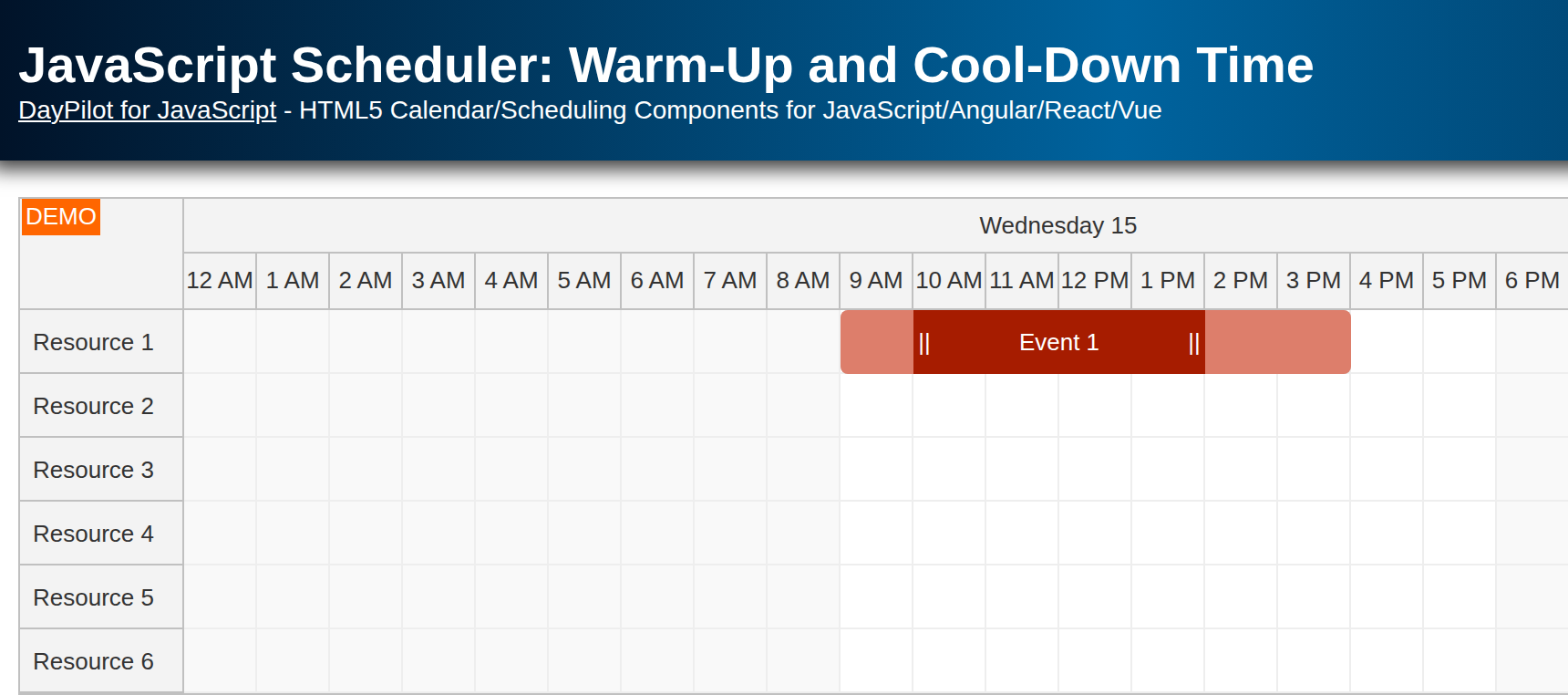
| Demo | |
|---|---|
| Downloads | |
| Languages | JavaScript |
Features
Warm-up and cool-down time displayed using active areas.
Custom moving handle allows drag and drop of the core event but not the additional time segments.
Custom resizing handles for resizing the core event.
License
Licensed for testing and evaluation purposes. Please see the license information included in the sample project. You can use the source code of the tutorial if you are a licensed user of DayPilot Pro for JavaScript.
Event Data
Our JavaScript Scheduler project is generated using DayPilot UI Builder. We will modify the generated file (index.html) and customize the Scheduler to support warm-up and cool-down time (before and after the core event).
The first step is to add a sample event. Note the custom warmupHours and cooldownHours properties. The total duration (start/end) includes the warm-up and cool-down time. The sample uses the current month so the event stays visible when you open it.
const events = [
  {
    id: 1,
    start: DayPilot.Date.today().addHours(9),
    end: DayPilot.Date.today().addHours(16),
    resource: "R1",
    text: "Event 1",
    warmupHours: 1,
    cooldownHours: 2,
  },
];
Displaying the Warm-Up and Cool-Down Time

The display is built in onBeforeEventRender. We will split the event into three segments using active areas.
onBeforeEventRender: (args) => {
  const warmupEnd = args.data.start.addHours(args.data.warmupHours);
  const cooldownStart = args.data.end.addHours(-args.data.cooldownHours);
  const segments = [
    {
      start: args.data.start,
      end: warmupEnd,
      top: 0,
      bottom: 0,
      backColor: "#dd7e6b",
    },
    {
      start: cooldownStart,
      end: args.data.end,
      top: 0,
      bottom: 0,
      backColor: "#dd7e6b",
    },
    {
      start: warmupEnd,
      end: cooldownStart,
      top: 0,
      bottom: 0,
      action: "Move",
      backColor: "#a61c00",
      fontColor: "#fff",
      horizontalAlignment: "center",
      verticalAlignment: "center",
      text: args.data.text,
      style: "cursor: move;",
    },
  ];

  args.data.html = "";
  args.data.barHidden = true;
  args.data.areas = [...segments];
},
The segment duration is specified as an hour offset, not using start and end time. This simplifies the data model. No additional modifications of the data are required during moving and resizing. The segments are calculated in onBeforeEventRender whenever the event position changes.
Adjusting Drag and Drop (Moving, Resizing)
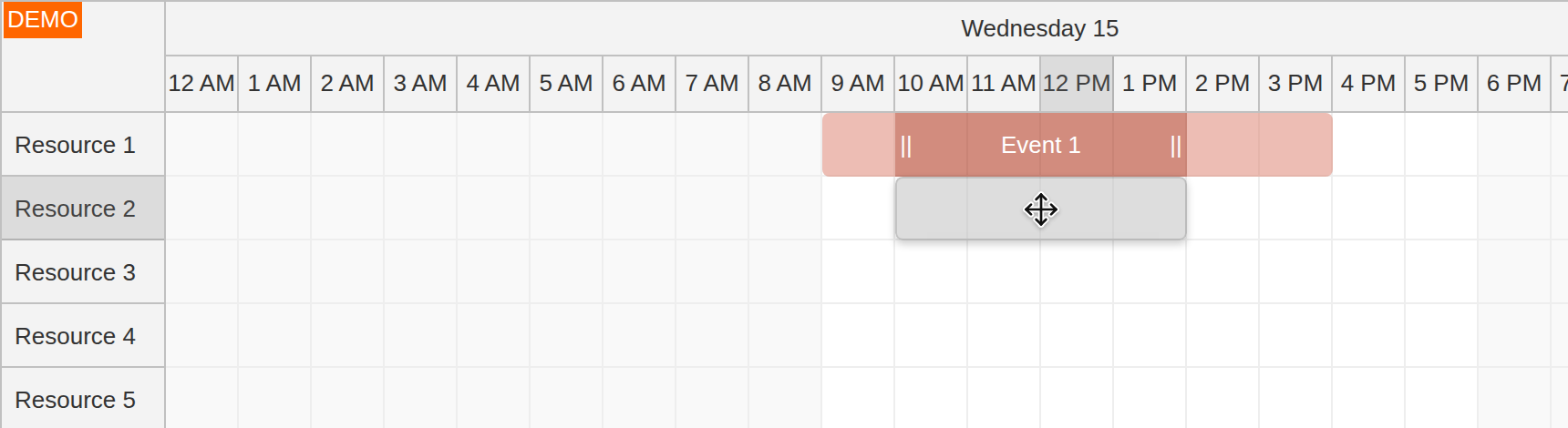
In this step, we will modify the default drag and drop behavior. Users will be able to move and resize the main event segment but not the warm-up and cool-down segments.
First, we will disable the default moving and resizing behavior using event properties (args.data.moveDisabled, args.data.resizeDisabled) and add custom drag and drop handles using active areas:
onBeforeEventRender: (args) => {
  const warmupEnd = args.data.start.addHours(args.data.warmupHours);
  const cooldownStart = args.data.end.addHours(-args.data.cooldownHours);
  const segments = [
    {
      start: args.data.start,
      end: warmupEnd,
      top: 0,
      bottom: 0,
      backColor: "#dd7e6b",
    },
    {
      start: cooldownStart,
      end: args.data.end,
      top: 0,
      bottom: 0,
      backColor: "#dd7e6b",
    },
    {
      start: warmupEnd,
      end: cooldownStart,
      top: 0,
      bottom: 0,
      action: "Move",
      backColor: "#a61c00",
      fontColor: "#fff",
      horizontalAlignment: "center",
      verticalAlignment: "center",
      text: args.data.text,
      style: "cursor: move;",
    },
  ];
  const dragHandles = [
    {
      start: warmupEnd,
      width: 12,
      top: 0,
      bottom: 0,
      action: "ResizeStart",
      fontColor: "#fff",
      horizontalAlignment: "center",
      verticalAlignment: "center",
      text: "||",
      style: "cursor: col-resize;",
    },
    {
      end: cooldownStart,
      width: 12,
      top: 0,
      bottom: 0,
      action: "ResizeEnd",
      fontColor: "#fff",
      horizontalAlignment: "center",
      verticalAlignment: "center",
      text: "||",
      style: "cursor: col-resize;",
    },
  ];

  args.data.html = "";
  args.data.moveDisabled = true;
  args.data.resizeDisabled = true;
  args.data.barHidden = true;
  args.data.areas = [...segments, ...dragHandles];
},
The next step is adjusting the moving and resizing logic:
onEventMoving: (args) => {
  args.start = args.start.addHours(args.e.data.warmupHours);
  args.end = args.end.addHours(-args.e.data.cooldownHours);
},
onEventMove: (args) => {
  args.newStart = args.newStart.addHours(-args.e.data.warmupHours);
  args.newEnd = args.newEnd.addHours(args.e.data.cooldownHours);
},
onEventResizing: (args) => {
  if (args.what === "start") {
    args.end = args.end.addHours(-args.e.data.cooldownHours);
  }
  if (args.what === "end") {
    args.start = args.start.addHours(args.e.data.warmupHours);
  }
},
onEventResize: (args) => {
  args.newStart = args.newStart.addHours(-args.e.data.warmupHours);
  args.newEnd = args.newEnd.addHours(args.e.data.cooldownHours);
},
History
April 14, 2026: Refreshed the sample to the current JavaScript project template, updated the code to modern JavaScript, switched the demo event to current date.